


How to check a laptop battery health?
We often purchased used or refurbished laptops for many reasons, like for a backup device. When purchasing used devices many buyers are concerned about the battery condition of the laptop. A weak battery requires to constantly put the device on charging or to install a new battery. This article will inform how you can check the battery health of your used or refurbished laptop.
For Windows users, below are the steps to check the battery status:
- Press Windows key + X
- Click on Windows Powershell

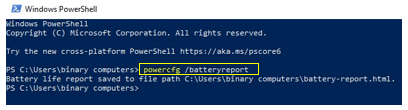
- Type the command in the terminal powercfg /batteryreport
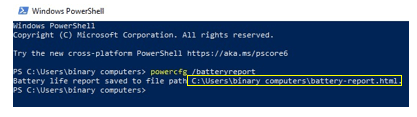
- Copy the link generated with this command and paste it on any browser
- Once you press enter you will open the batter report. In this report, the main thing is design capacity which is the capacity that shows battery health when the batter was new, whereas the full charge capacity is the present capacity of the battery.

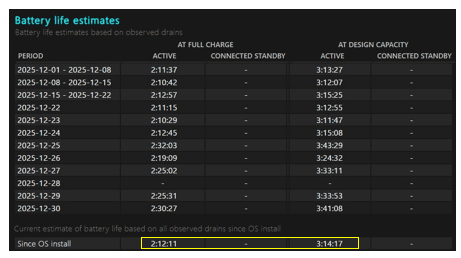
- When you further scroll down, you will find the batter life estimates. At the bottom of this table you will see two estimated backups. Again, design capacity column shows the backup time when your battery was new and the full charge column shows the present battery time.
How to check laptop keyboard?
Often laptop keyboard of used or refurbished keyboards have some keys that are not functional. You can check the entire keyboard with just one link:
- Type the following address in any browser: https://en.key-test.ru/
- You will open the following keyboard:
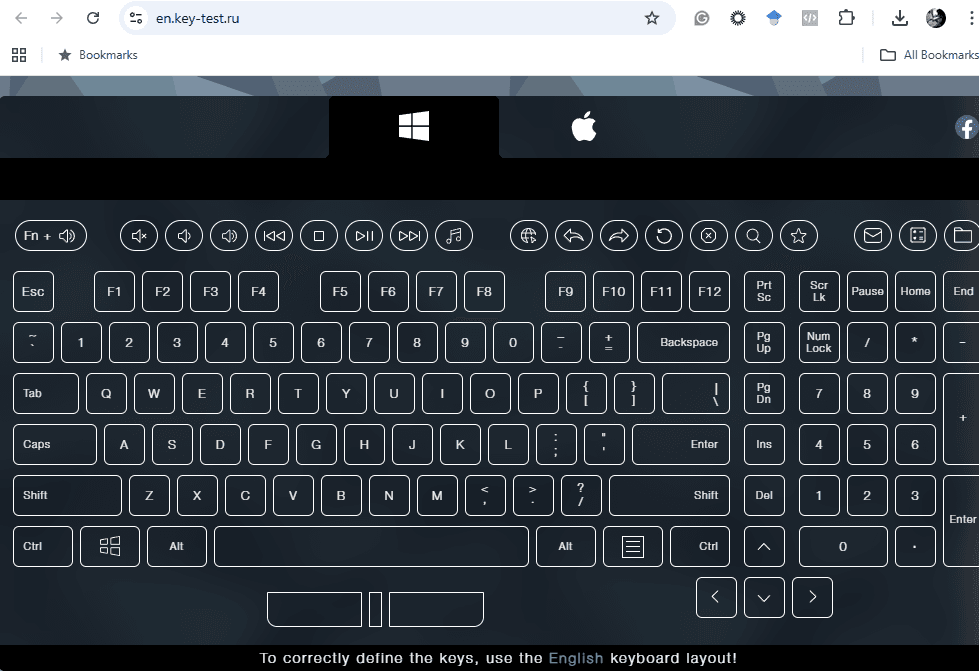
- As you press keys on your keyboard, your entire keyboard turns white. Once you press all the keys you will know which keys are out of order.

So, next time when you are purchasing the used or refurbished laptop from eBay or any other website you can easily check its battery and keyboard, and estimate its cost based on the model and other specifications. Moreover, if you’re selling your laptop it is a good practice to show battery health and keys functioning to become an ethical seller and keep things transparent.